Get Started with reality Server
Note:
ArcGIS Reality Server is a beta feature at ArcGIS Enterprise 12.0. While in beta, this capability may not be feature complete and, as such, may have known performance or quality issues and will not be supported by Esri Technical Support.
Feedback on this feature can be provided in the ArcGIS Enterprise 12.0 Beta Features Early Adopter Community.
ArcGIS Reality Server tools are currently accessible using ArcGIS Pro as a client to define the reality mapping processing to be applied on the server. Automation and customization are also possible through ArcGIS API for Python and ArcGIS REST API.
Using ArcGIS Pro as a client for reality server
ArcGIS Pro provides a comprehensive workspace UX for reality mapping for Drone, Digital Aerial and Satellite Images. If ArcGIS Pro is connected to an Enterprise Site configured with reality server, image adjustment and 2D/3D product generation can be delegated to be processed on the Server. Products generated are automatically shared as imagery layer (True Ortho/DTM/DSM), Scene Layer (3D Mesh) or Point Cloud layer (3D Point Cloud) on the portal.
Note:
Pro needs Standard or Advanced License to be used as a client for reality server.
Follow this step to use ArcGIS Pro as client for drone, digital aerial or satellite data processing reality server in PRO:
Add and set an ArcGIS Enterprise configured with Reality Server as an active portal in ArcGIS Pro.
See tutorial: Manage portal connection from ArcGIS Pro for more details.
Create a Reality mapping workspace to be processed on the server.
On the
Imagerytab, click theNew Workspacedrop-down menu and chooseNew workspace.In the
Workspace Configurationwindow, provide a name for the workspace and specified other settings accordingly.Check the
Process this image collection on server.You won't see this option if your active portal connection is not an ArcGIS Enterprise Site configured with reality server.
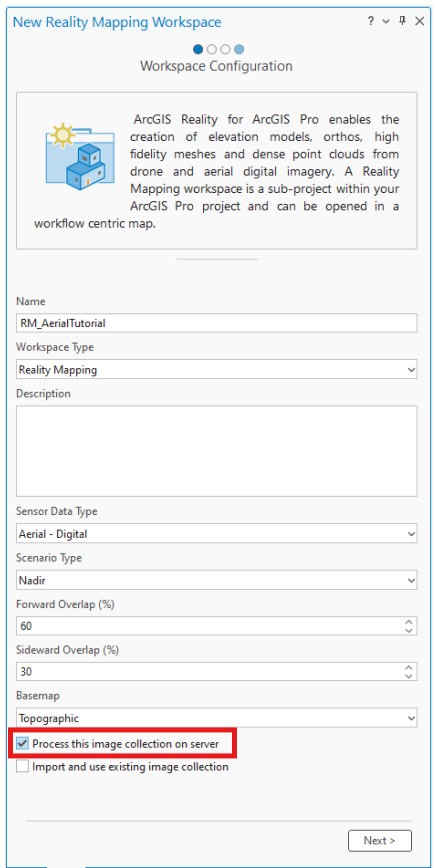
Accept other default and click
Nexttill you finish the Reality mapping workspace Creation.See tutorial: Create or import a Reality mapping workspace for more details
These are the general steps to process drone, digital aerial and satellite imagery with reality server using ArcGIS Pro as a client. Detail tutorial of the different sensor workflow can be found in below:
Create drone imagery products in ArcGIS Reality for ArcGIS Pro
Create 2D digital aerial imagery products in ArcGIS Reality for ArcGIS Pro
Create 3D digital aerial imagery products in ArcGIS Reality for ArcGIS Pro
Create a digital surface model product from satellite imagery in ArcGIS Reality for ArcGIS Pro